Project Overview
- Project: AudioTales
- Timeline: 6 weeks
- Role: UX/UI Designer
- Tools: Figma, Linearity
- Platform: iOS
- Goal: Design a calm, intuitive audiobook app focused on discovery and seamless listening
- Team: Solo project
As an avid audiobook listener, I was never able to find an audiobook service that would fully satisfy my expectations and every app that I used was disappointing in one way or another. Considering that, it is not surprising that as I was learning about UX design, this project was constantly in the back of my head. I decided to tackle it as my first UX project, since I already have an understanding of what is good and what is possibly lacking in audiobook apps that are currently available on the market.
I didn’t want to rely solely on my experience, which is why I did research across audiobook-focused groups on Reddit and Facebook. It gave me an idea of what other people’s experiences with these apps look like. I also sent a short survey to some of my friends, who also listen to audiobooks regularly.
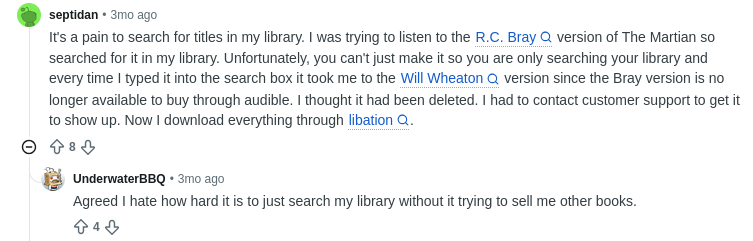




Many audiobook listeners report problems with navigation within their apps, such as library organisation or discovery of new content. Existing apps often feel cluttered, unintuitive, or overwhelming for users. People also mentioned a few functionalities that are lacking.
Problem: Audiobook apps can make it difficult for users to find the right story, return to an interrupted book, or organize the content they want to listen to.
My solution: design a calmer audiobook experience that reduces friction between finding a book, starting a listening session, and returning to it later.
With this short research done, I was ready to take a deeper dive into existing apps and see what benefits they provide as well as what their downsides are.
1. Empathise
To identify the areas of opportunity, I conducted research within the four most popular audiobook apps. The goal of this stage is to determine what the current audiobook app market offers to its users, which will allow our app to compete with the companies already established on the market. Finding solutions to existing problems and implementing them in our app will allow us to create the best audiobook listening experience for our users.
Competitors: Audible, Everand, Libro.fm, Storytel.
| Audible | Everand | Libro.fm | Storytel | |
|---|---|---|---|---|
| pros | – huge library – exclusive titles | – all in one (audio, ebooks, magazines) – huge amount of content for a fixed price | – supports local bookstores – full ownership of the bought books | – unlimited listening for a fixed price – smooth app functionality |
| cons | – expensive – extra content – costs more | – poor UX – when you stop the audio, it has trouble with playing again | – no easy subscription with a fixed price – you need to buy credit to use it on books | – unexpected content changes |
After identifying and researching the competitors, I can analyse the pros and cons they have. I established the two biggest factors that have to be taken into consideration when creating a new app:
- type of content – while Storytel and Libro.fm offer only books in either audiobook or ebook format, Everand and Audible have a wider selection of content, including podcasts and magazines
- type of subscription – Everand and Storytel work with a fixed subscription plan, in which the user pays the same amount every month for unlimited access to the library of books available to them for as long as the subscription is active. Depending on the plan you choose, Audible gives monthly credits to buy audiobooks and listen to a rotating catalog of titles at no extra cost. While Libro doesn’t offer books with their subscription, users can buy them with credit and own them.
Competitive analysis revealed common pain points: poor personalization, complicated libraries, inconsistent playback controls, and overwhelming UI. Major audiobook apps have gaps in simplicity, personalization, and seamless listening experience.
2. Define
The insights I took from the user and market research allowed me to start the data analysis.
Affinity Map
I chose to create an affinity map to organise ideas and frustrations users experience while listening to audiobooks. Research insights were grouped into behavioral themes using affinity mapping to identify recurring frustrations and unmet needs.
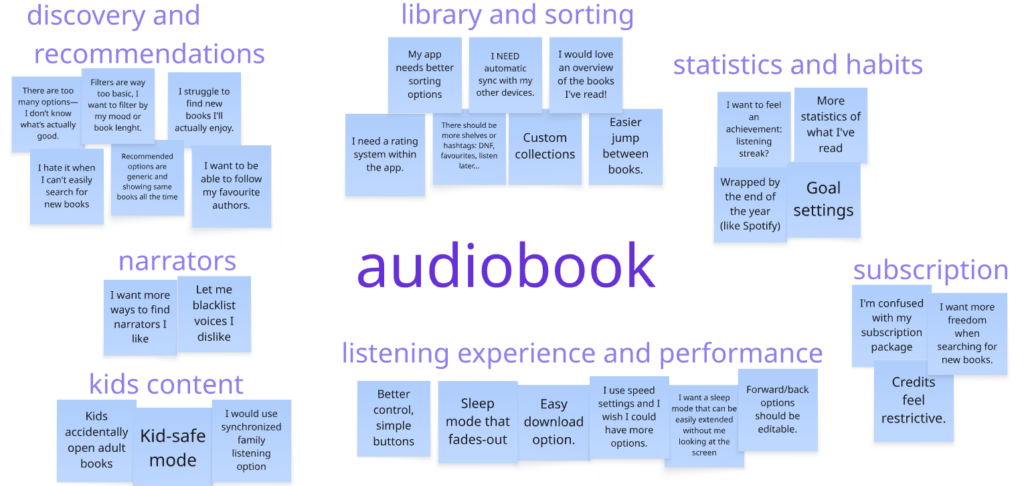
The affinity map made it easier for me to visually see categories of problems people encounter when using audiobook apps. Some of them, such as credit system and subscription packages, are less relevant to the UX designers, but I would still keep them as research information that can be passed on to developers.
Other problems are easier to tackle. The functionalities that are mentioned the most are smart resume, easy search/sorting, statistics and kids mode.
I decided to not pursue adding blacklisting of authors or narrators within my app. It was mentioned sporadically as a “nice to have” option, but other functionalities have higher priority over it. I would keep this point as something to look into in the future.
User Personas
I created user personas that will represent different characteristics and needs of people who use audiobook apps. A user persona helps designers imagine a typical user by giving them a name and face. This process helps understand who they are designing for and establish what users expect from the app.
Alex Kennedy
Age: 32
Occupation: Marketing Specialist
Location: Large urban city
Tech Comfort: High
Devices Used: Smartphone, wireless earbuds
Lifestyle: Full-time job, commutes daily via subway, limited free time
Reading habits: ~ 20 books per year

| Behavior Patterns | Goals | Pains | Opportunities |
|---|---|---|---|
| – Listens to audio content during commutes and gym sessions. – Primarily consumes self-improvement and business-related audiobooks. – Uses audio to stay productive and “maximize” downtime. – Prefers quick browsing and personalized recommendations. | – Learn new skills while commuting. – Find high-quality titles quickly without endless scrolling. – Build a consistent habit of personal development. – Use idle time to stay motivated and career-driven. | – Overwhelmed by too many choices; hard to know what’s worth listening to. – Frequent interruptions in commute break audiobook focus. – Existing apps feel cluttered and not optimized for fast navigation. – Can’t have goals and statistics without using an external app. | – Smart personalized suggestions. – “Short version” summaries. – Seamless offline mode for subway. – Quick resume + chapter highlights for commuting breaks. |
Maya Beauchamp
Age: 27
Occupation: Graphic Designer
Location: Suburban town
Tech Comfort: Medium
Devices Used: Smartphone, smart speaker at home
Lifestyle: Introverted, values calm and creative inspiration
Reading habits: ~ 150 books per year

| Behavior Patterns | Goals | Pains | Opportunities |
|---|---|---|---|
| – Uses audiobooks in the evenings or weekends to relax, or during the day while doing chores. – Prefers fiction: fantasy, mystery, cozy stories. – Loves narrator performance and wants immersive audio experiences. – Listens to a lot of books. | – Unwind after long days. – Explore more stories similar to ones she already loves. – Build a personal library of comfort-reads. – Improve mental well-being through relaxing routines. | – Has to constantly look for new books. – Hard to find narrators with voices she enjoys. – Existing apps don’t highlight “vibe” or atmosphere of stories. – Poor sleep-timer features frustrate her when falling asleep to books. | – Mood-based browsing (e.g., “Cozy,” “Calming,” “Whimsical”). – Strong narrator filters. – Advanced sleep timer (fade-out, resume where sleep was detected). – Beautiful library UX for collecting favorites. |
Peter Goodman
Age: 41
Occupation: Full-time Parent / Part-time Freelancer
Location: Medium-sized city
Tech Comfort: Medium-High
Devices Used: Smartphone, tablet
Lifestyle: Very busy, balances family life and work
Reading habits: ~ 60 books per year

| Behavior Patterns | Goals | Pains | Opportunities |
|---|---|---|---|
| – Listens while cooking, driving, cleaning, or doing childcare tasks. – Prefers a mix of parenting books, productivity guides, and children’s audiobooks. Frequently switches between adult and kids’ content. – Needs quick transitions between devices and profiles. | – Find time-efficient ways to consume content amid a chaotic schedule. – Keep kids engaged with safe, age-appropriate stories. – Improve parenting skills and personal well-being. – Build routines where listening is a natural part of family life. | – Typical audiobook apps are not family-friendly. – Kids accidentally mess up progress or settings. – Hard to keep track of multiple audiobooks at once. – Long books are difficult to finish without losing track. | – Child-safe mode + separate kids’ library. – Multi-device syncing with instant switching. – Chapter-level bookmarks for fragmented listening. – “Family playlists” for shared listening in the car. |
Journey maps
To understand users’ pain points in the process of using an audiobook app, I created journey maps for each of the personas. The goal of the journey was to search for a book they would like to listen to. After analysing each map, the main problems can be identified by looking into the emotions behind each step the persona took through the journey.
- Alex gets frustrated when an interruption during his commute breaks his momentum and he loses track of what he was listening to.
- Alex is overwhelmed by too many choices when browsing for a new book.
- Maya is annoyed when app filters don’t let her look for a particular ‘vibe’ of the story.
- Maya is frustrated when the sleep timer can’t be adjusted as she likes.
- Maya is sad that she cannot create her own aesthetic digital library with books the she read.
- Peter is disturbed when the books he reads for himself get lost among the books he lets his kids listen to.
Based on these statements, I am now able to define the problems users face when using audiobook apps:
- Users are discouraged when momentum is repeatedly interrupted, and the app doesn’t support short listening cycles.
- Users feel overwhelmed because there is no efficient way to filter through massive libraries and quickly find high-value content.
- Users feel disappointed because there is no reliable way to discover books that fit their emotional or atmospheric preferences.
- Users lose trust in bedtime listening flows because sleep timers are inaccurate or too limited.
- Users need a way to curate their own library.
- Users feel stressed because there is no family-friendly system to separate adult content from kids’ content.
“How Might We”
With the problems I defined, I can now use the ‘how might we’ (HMW) exercise to translate problems into opportunities for design:
- HMW support listeners who frequently stop and resume so they can maintain momentum and feel in control of their progress?
- HMW help users quickly narrow down huge catalogs and confidently find content that feels worthy of their time?
- HMW enable users to discover content based on mood, atmosphere, or emotional tone rather than just genre?
- HMW create a smarter, more intuitive bedtime listening experience that adapts to how users naturally fall asleep?
- HMW empower users to build custom libraries that reflect their tastes and habits?
- HMW design a family-safe system that keeps adult and child content separate while making it easy for parents to manage?
After analysing all the information I gathered, I came up with concepts of features that I want to implement:
- Mood-Based Discovery
- Smart Resume
- Personal Library
- Adaptive Sleep Timer
- Kids Mode
For this project I’ve decided to focus on the first three points. The other two are an opportunity to come back to this project in the future and expand it with the knowledge I gain in the meantime.
3. Ideate
In this part of the process I will use insights and outcomes from the two previous stages and try to come up with different ideas for the app design. It is a crucial step, as it pushes designers to come up with new ideas.
I created multiple architecture models for the app. After analysing them and discussing them with fellow audiobook listeners, I chose and polished one that is not too complicated, but also allows implementation of all the features I wanted.
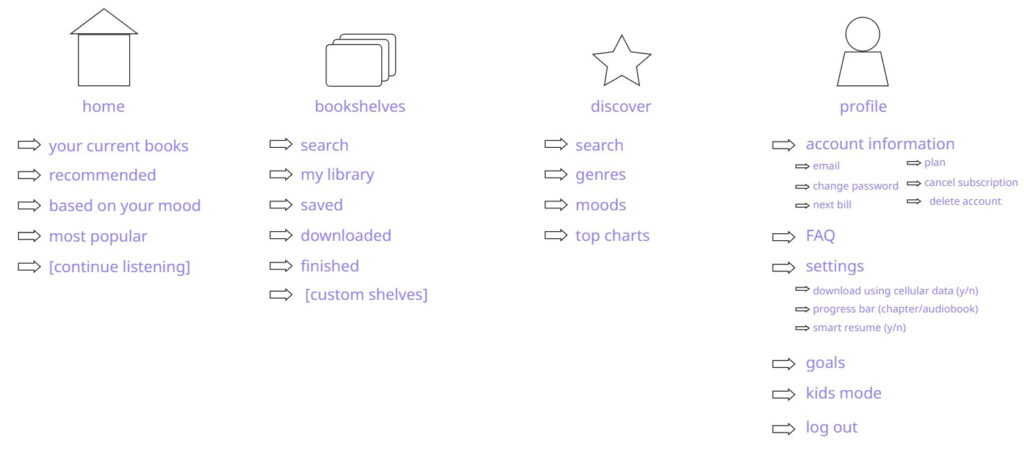
This is a basic architecture structure. It may be slightly changed in a later stage of the design process, but it will give me a base to start working with.
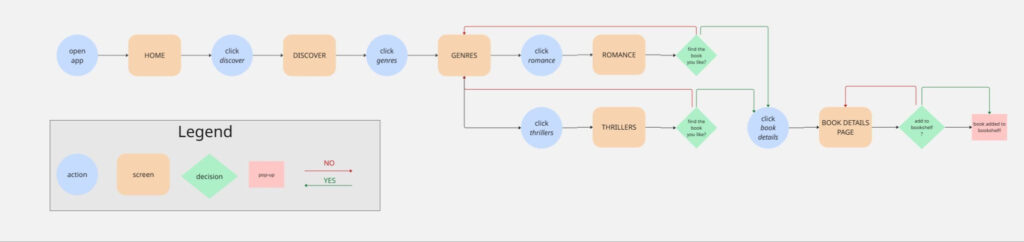
The next stage is creating user flows. The user flow below shows in detail all the steps user will go through to add a new book to favourites.
4. Design
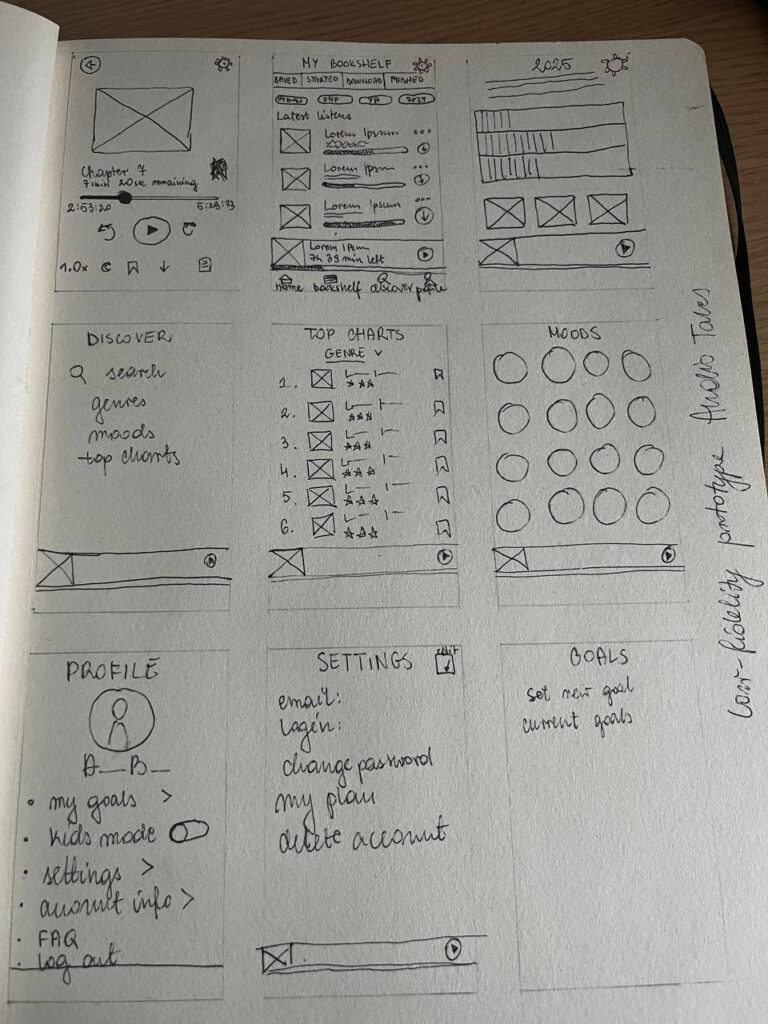
Lo-fi sketches
I started my design with a lo-fi prototype created with pen and paper. It allowed me to quickly write down my ideas and choose a layout I was satisfied with.
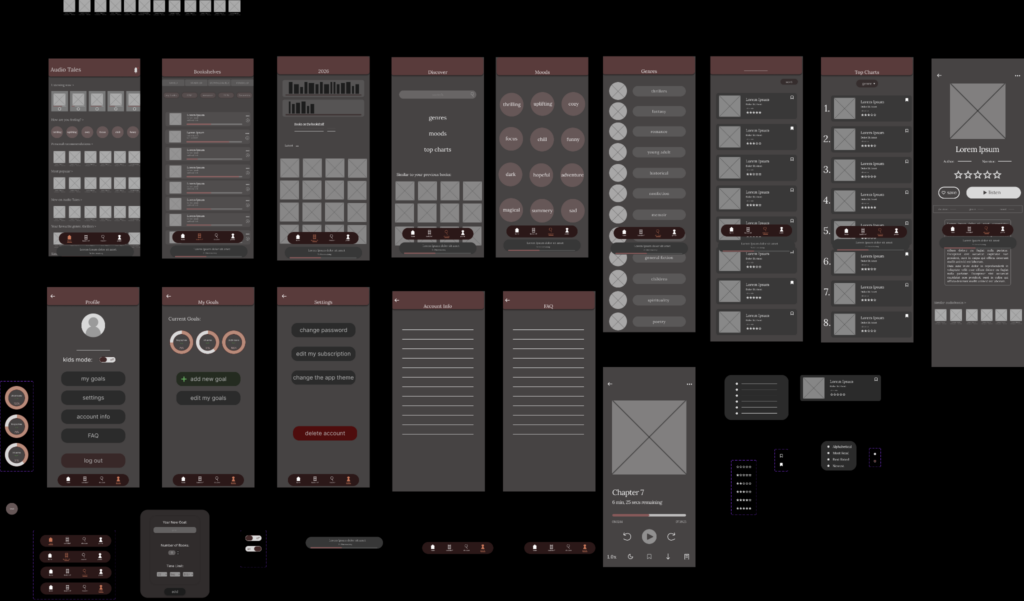
Mid-fi Wireframes
To work on the structure of the app, I made the mid-fi wireframes in Figma. As it was my first time working with the program, I had to redo many features later.
Creating the design
The next step was to develop a style my design would follow.
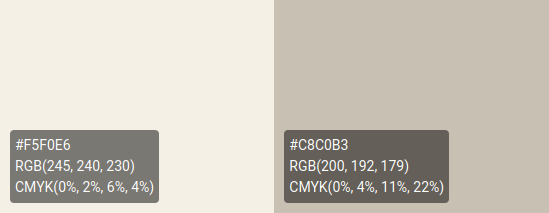
My goal when it comes to aesthetics is to make it feel warm and cozy, in opposition to other platforms which may come across as more “modern” or tech-oriented. Rather than just a platform with content on it, I wanted to create an app that feels more like a quiet corner for listening to books.
In order to achieve that, I made a color palette focused on greens as a main color, with addition of some pastel shades which serve as accents.

With such a colorful palette I decided to keep text simple and neutral.
High-fidelity prototype
I turned my Figma project into a high-fidelity prototype, which is a realistic, clickable version of the app.
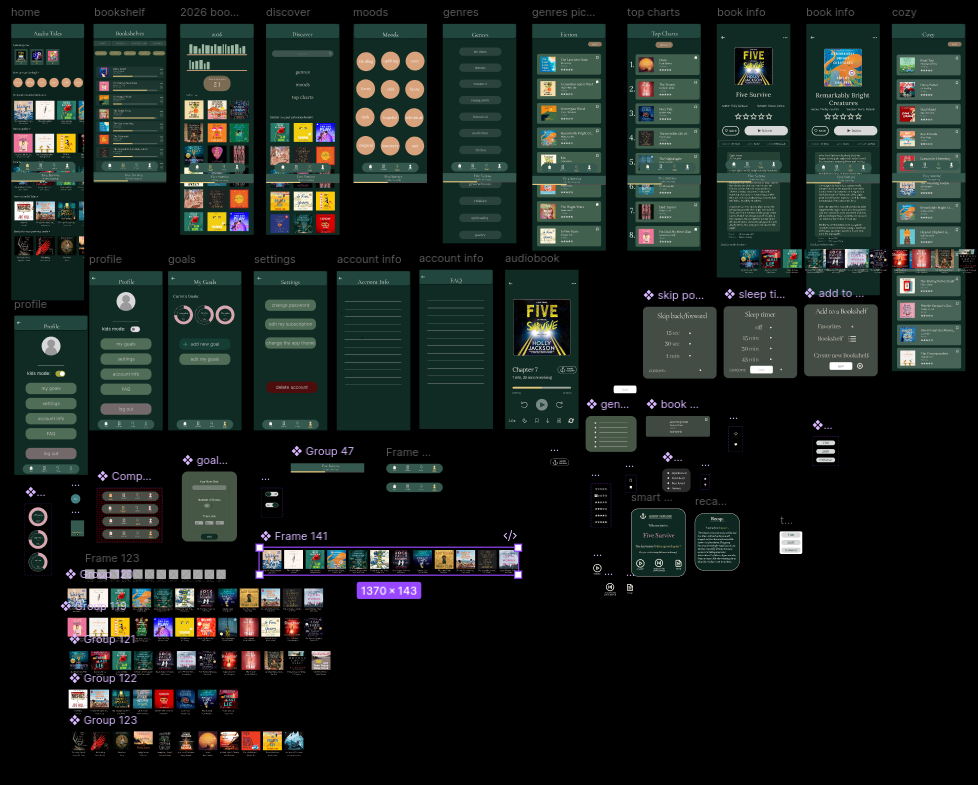
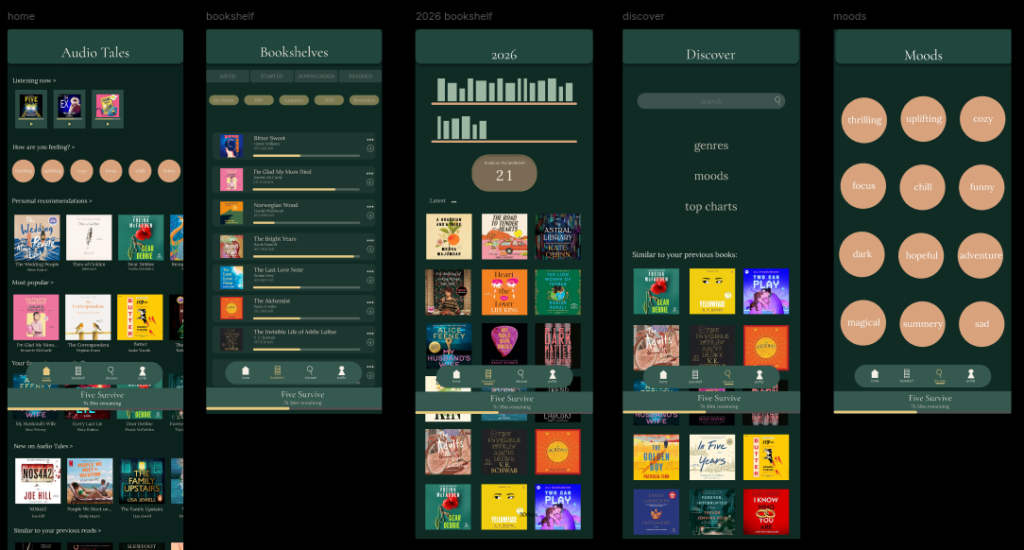
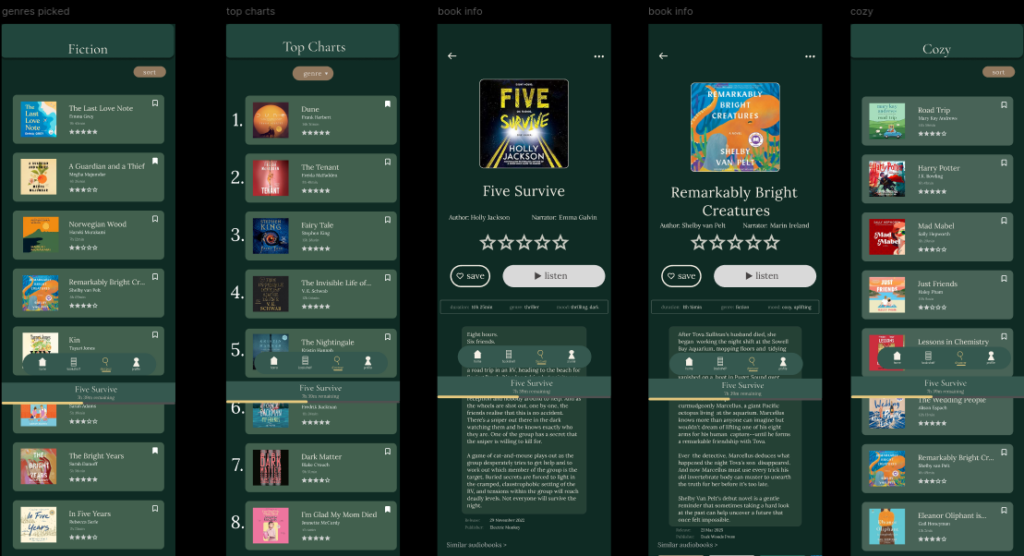
The design looks as it was intended to: calm, simple and clear. Now it is time to focus on the features that I wanted to implement:
- Mood-Based Discovery
- Smart Resume
- Personal Library
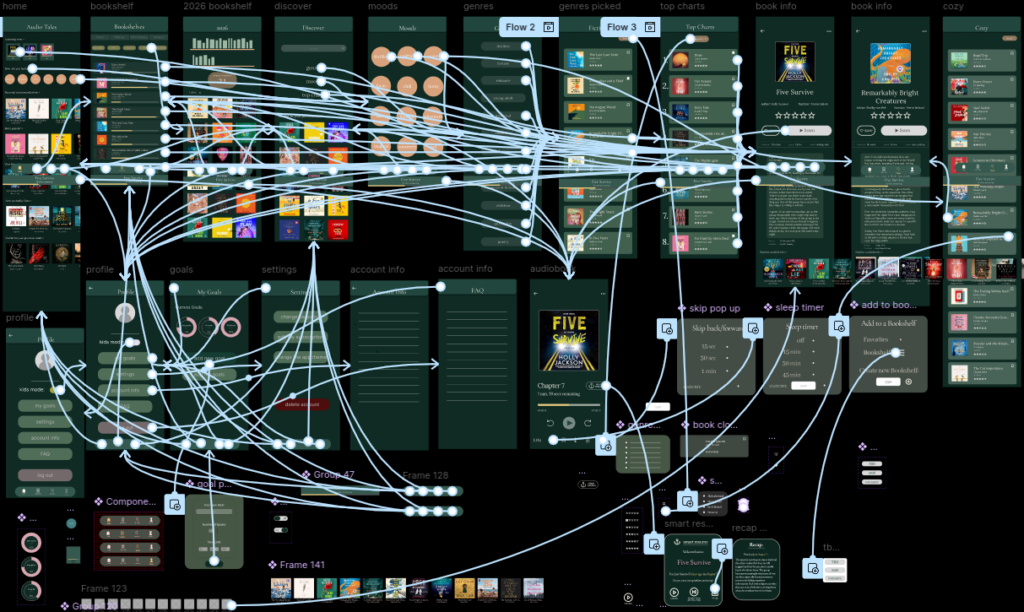
Here is an overview of the project after prototyping:
Mood-Based Discovery
Discover audiobooks based on mood and atmosphere: the perfect solution for those who are undecided on genre, but want the story to match their mood.
Feel like listening to something cozy?
Click on the “discover” button on the bottom bar, then choose “moods” to browse, “cozy”, and then pick the book that you like.
Smart Resume
Smart Resume makes returning to an audiobook easier by remembering the user’s exact listening position and providing additional context when needed. After a longer break, users can choose to get a short recap before continuing.
Quickly return to an interrupted audiobook to the exact location you paused it, or the previous starting location. When doing so, you also get the option to read a small recap should you have taken a longer break.
Click on your current book at the bottom bar, then choose “smart resume”. Pick a continuation option, or open the “recap” before doing so to get a short summary of the chapter you listened to previously.
Personal Library
Large audiobook libraries can become difficult to navigate as users collect books they want to read. Creating your themed personal libraries can make managing the collections faster. Instead of only “favourites”, you can create separate folders to put in one place books from a specific genre, author, year of reading and many others.
To add a book to your own library, click on a bookmark next to the book you want to save, then on the pop up screen click “bookshelf” and pick one of the options.
Reflections
This project taught me that designing an intuitive interface is not only about simplifying the visual design. My initial concept included more features than I could meaningfully support, so I learned to prioritize functionality based on user needs and project scope.
With more time, I would further test the mood-based recommendation system and explore how personalization could improve discovery without making the interface feel overwhelming.